The programme page: options, registrations and invoices
Loading…
Each programme has its own page where you see its options, who is registered and the invoices. From here you can register members, change dates or prices for several options at once, and drag members in from the group.
Go to Home → Programmes and click the programme's name. At the top you see the programme's visibility, group, gender, birth years and location, with View in shop and Finances.
The page has three tabs: Purchase Options, Registrations and Invoices.
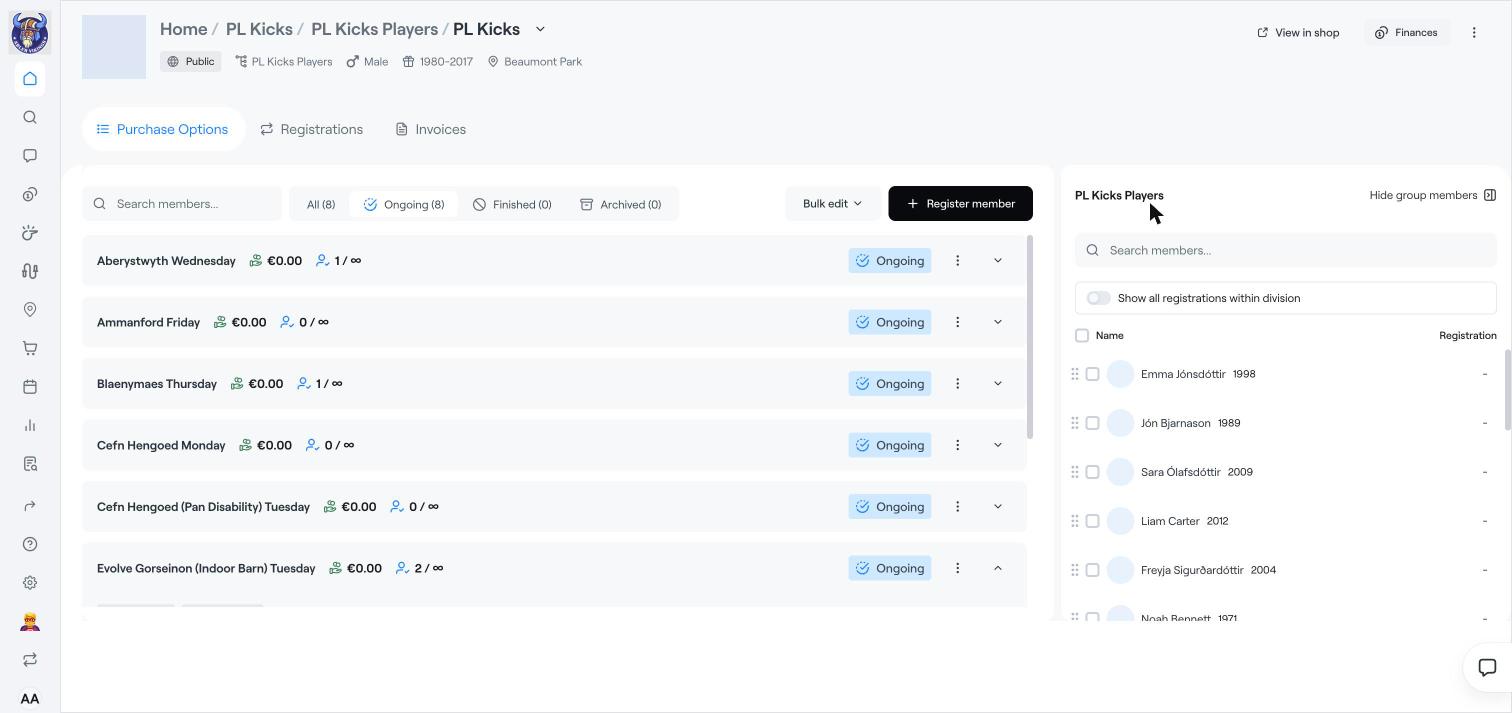
Each option shows its price, how many are registered out of the maximum (∞ means no limit) and its status. Filter by Ongoing, Finished or Archived, or search for a member.
Click the arrow on an option to see who is registered to it.
Click the three dots (⋮) on an option to Message the members, Export as Excel, Duplicate the option or Archive it.
Bulk edit: tick several options to Change registration dates, Change start and end or Edit price for all of them at once.
Click Register member to register someone to an option. See Register members to a programme.
Or click Show group members to see the group in a panel on the right, and drag members onto an option. Turn on Show all registrations within division to see their other registrations.
Registrations: everyone registered to the programme, with purchase date, invoice status and registration status.
Invoices: all invoices for the programme, with filters for status, date, bank account, payment method and members.
Create a programme
Register members to a programme
Edit, clone or archive a programme