Edit, clone or archive a programme
Loading…
From the programme list you can change a programme, copy it to make a new one, or archive it when it is over. This is useful at the start of a new season, when you can clone last season's programme instead of creating everything again.
Example: you clone "U12 – Development Pathway Fee 25/26", change the dates and price, and publish it as the 26/27 season.
Go to Home → Programmes.
Use All, Active, Finished or Archived, the search box or Filter to find it.
Click the three dots (⋮) at the end of the row.
The list also shows each programme's group, price, duration, Attention (for example unpaid invoices), number of registrations, visibility and status.
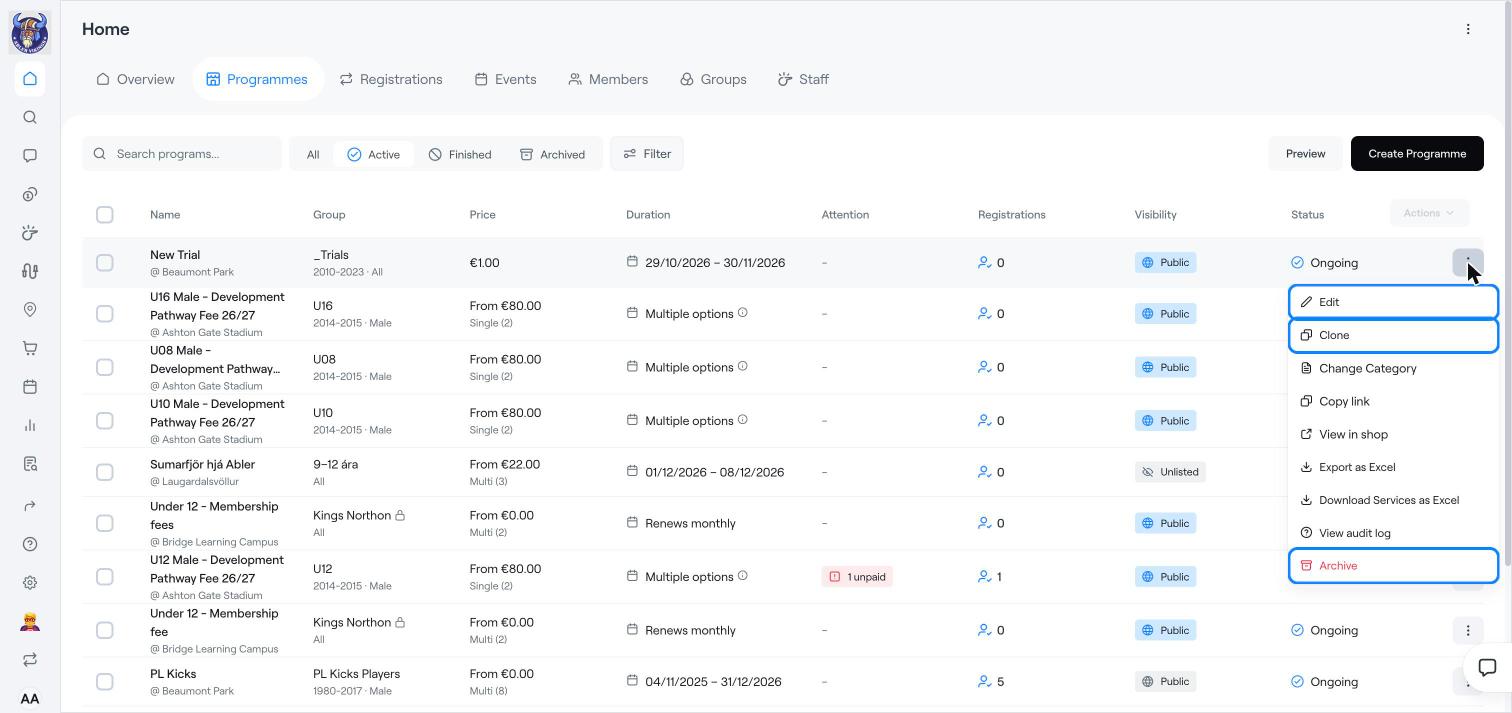
Edit: change the name, description, options, prices, dates and settings. See Create a programme for what each field means.
Clone: make a copy with the same settings. Change what is different, for example the dates, prices and season name, and save it as a new programme.
Change Category: move the programme to another shop category.
Copy link and View in shop: share or open the programme's page in your shop.
Export as Excel and Download Services as Excel: download the registrations and options.
View audit log: see who changed the programme and when.
Archive: hide a finished programme from the list and the shop. Archived programmes are kept under the Archived filter.
Archiving does not cancel registrations or invoices. End or cancel those first if needed.
Use Preview at the top of the list to see the programmes as members see them in the shop.
Create a programme
Register members to a programme
End a registration