Example: Subscription with a fixed end date
Loading…
This example shows how to set up a monthly subscription that stops automatically on a set date, for example at the end of a season. Askja charges the last, shorter period pro rata, so families only pay for the days left. For a full walkthrough of every field, see Create Programme.
Example: U10 autumn membership at €25 per month, running from September until 16 December 2026.
A monthly payment plan that should stop at the end of a season or term.
Memberships that run until a fixed date instead of until the member cancels.
Go to Home → Programmes, click Create Programme and choose the group.
Enter the programme name, for example U10 Autumn Membership 2026.
Choose the Location, Payment account and Category.
Click the programme type and choose Subscription — Weekly, monthly, or yearly billing.
Rename the option, for example Autumn membership.
Enter the price, for example 25, and keep per month.
Next to Ends, click when cancelled.
Choose Custom date and pick the last day, for example 16 December 2026.
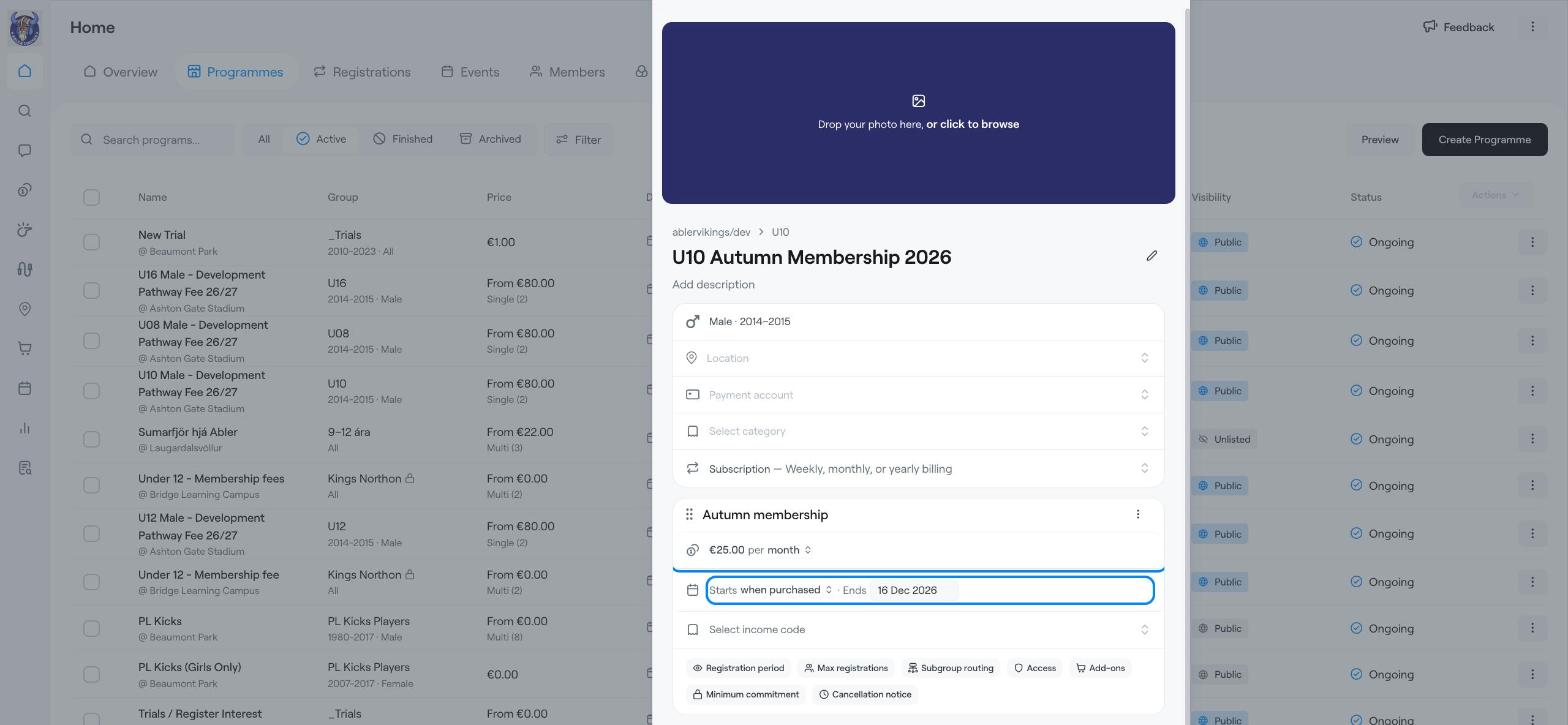
When a subscription has a fixed end date, the last period is shorter than a full month, so Askja calculates it pro rata. In this example a member who joins on 1 September pays the full €25 for September, October and November. On 1 December Askja sees that the subscription ends on 16 December and charges a reduced amount for those 16 days instead of a full month.
Add any optional settings you need, such as Max registrations or Subgroup routing, and click Create Programme.
Other end options are When cancelled (the member pays until they cancel) and After a number of months (the subscription stops after a set number of billing periods).
Example: Monthly membership (subscription)
Create a subscription-based programme
Create Programme