Example: Free programme or trial session
Loading…
This example shows how to set up a free programme, for example a trial session for new players or a sign-up list where you only want to collect names. Members register in the shop as usual, but nothing is charged. For a full walkthrough of every field, see Create Programme.
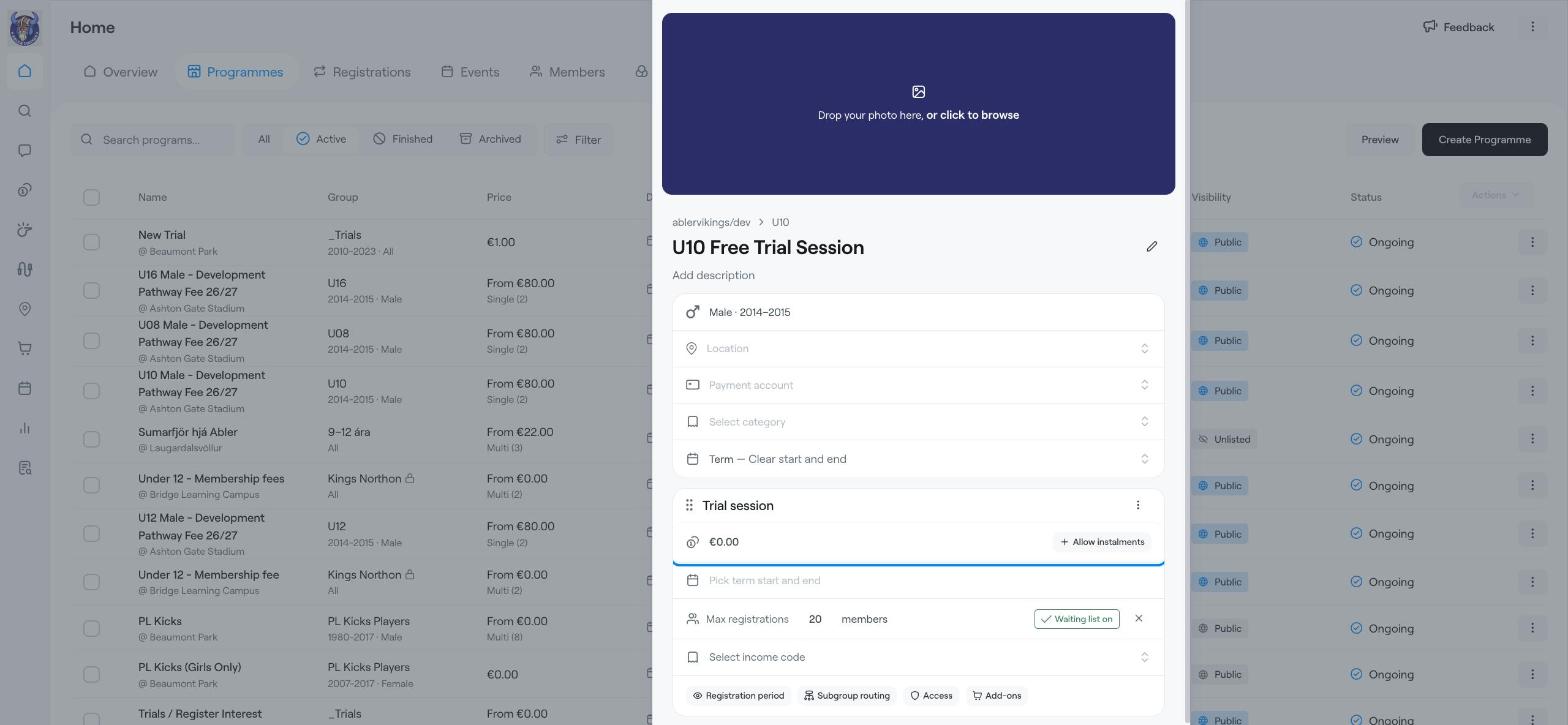
Example: a free U10 trial session with 20 places and a waiting list.
Trial sessions and open days.
Registering interest before a new group starts.
Free activities where you still want to know who is coming.
Go to Home → Programmes, click Create Programme and choose the group.
Enter the programme name, for example U10 Free Trial Session, and a description with the date, time and what to bring.
Choose the Location and Category.
Keep the programme type as Term — Clear start and end.
Rename the option, for example Trial session.
Leave the price at €0.00.
Click Pick term start and end and choose the date.
If places are limited, click Max registrations, enter the number of places and click Allow waiting list.
Open Advanced settings:
Under Status, choose Unlisted if only people with the direct link should be able to register, for example when you invite specific players. Choose Public if anyone can find it in the shop.
Turn on Disable care and safety collection if you do not need medical, emergency contact or safety details for this programme.
Click Create Programme.
When the trial is over, you can register the players who want to continue in your paid programme. See Register members to a programme.
Create Programme
Example: Camp or course with several weeks and limited places
Register members to a programme