Example: Monthly membership (subscription)
Loading…
This example shows how to set up a membership that families pay every month until they cancel. You can also require a minimum commitment and a cancellation notice period. For a full walkthrough of every field, see Create Programme.
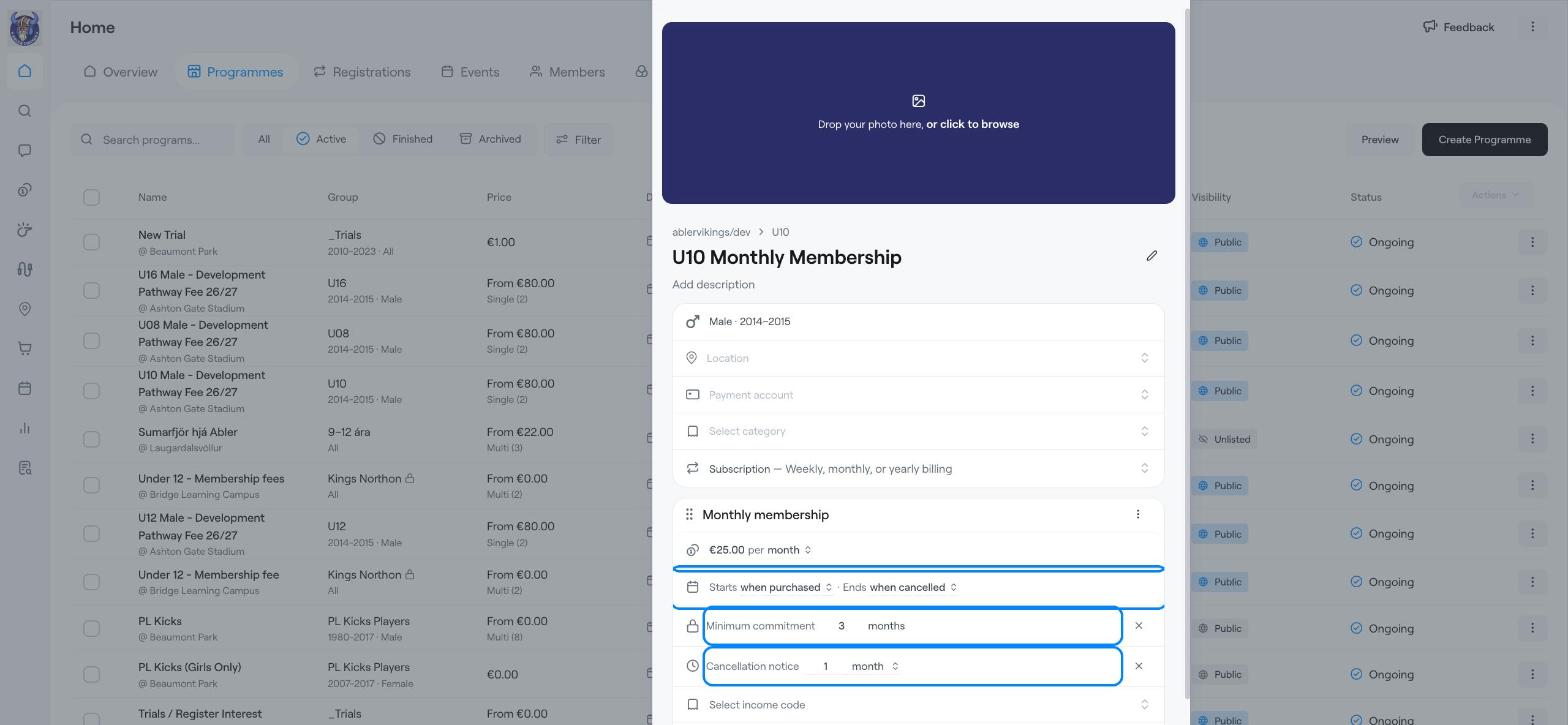
Example: U10 monthly membership at €25 per month, with a 3-month minimum commitment and 1 month's notice to cancel.
Ongoing memberships with no fixed end date.
Gym, fitness or class memberships.
Training fees that you prefer to collect monthly instead of per term.
Go to Home → Programmes and click Create Programme.
In Select a group, choose the group.
Enter the programme name, for example U10 Monthly Membership, and a short description.
Choose the Location, Payment account and Category.
Click the programme type and choose Subscription — Weekly, monthly, or yearly billing. Members pay on a recurring schedule until they cancel.
Click Subscription and rename the option, for example Monthly membership.
Enter the price, for example 25.
Click per month to choose how often members pay: daily, weekly, monthly, yearly, every set interval or one-time payment.
Starts: when purchased, on the 1st of next month, or on a custom date.
Ends: when cancelled, after a number of months, or on a custom date. For a membership that should stop on a fixed date, see Example: Subscription with a fixed end date.
Click Minimum commitment and enter how long members must stay before they can cancel, for example 3 months.
Click Cancellation notice and enter the notice period, for example 1 month.
Like other programmes, each subscription option can have a Registration period, Max registrations (with a waiting list), Subgroup routing, Access and Add-ons. You can offer several options, for example a monthly and a yearly price, with Add Subscription. When you are ready, click Create Programme.
In Advanced settings, turn on Remove Member from Group when subscription expires if members should leave the group automatically when their subscription ends.
Create Programme
Create a subscription-based programme
Example: Training fees for a season (term with instalments)
Change the Charging Date in Instalment Plans