Write off an unpaid balance
Loading…
A write-off closes an unpaid amount on an invoice that the club no longer expects to collect. Unlike cancelling, the invoice stays in your records and the written-off amount is recorded.
Example: a family paid most of the season fee, but a small amount is still open and the club decides not to chase it.
Write-off: the member owes money, but the club decides not to collect it.
Apply discount: the member should pay a lower price from the start, for example a sibling or hardship discount.
Cancel invoice: the invoice should not exist at all, for example a duplicate. See Cancel unpaid invoices (one or many).
Go to Finance → Invoices (the coin icon in the left menu). Change the date filter if you cannot see the invoice.
Find the invoice and click the three dots (⋮) at the end of the row.
Choose Write-off.
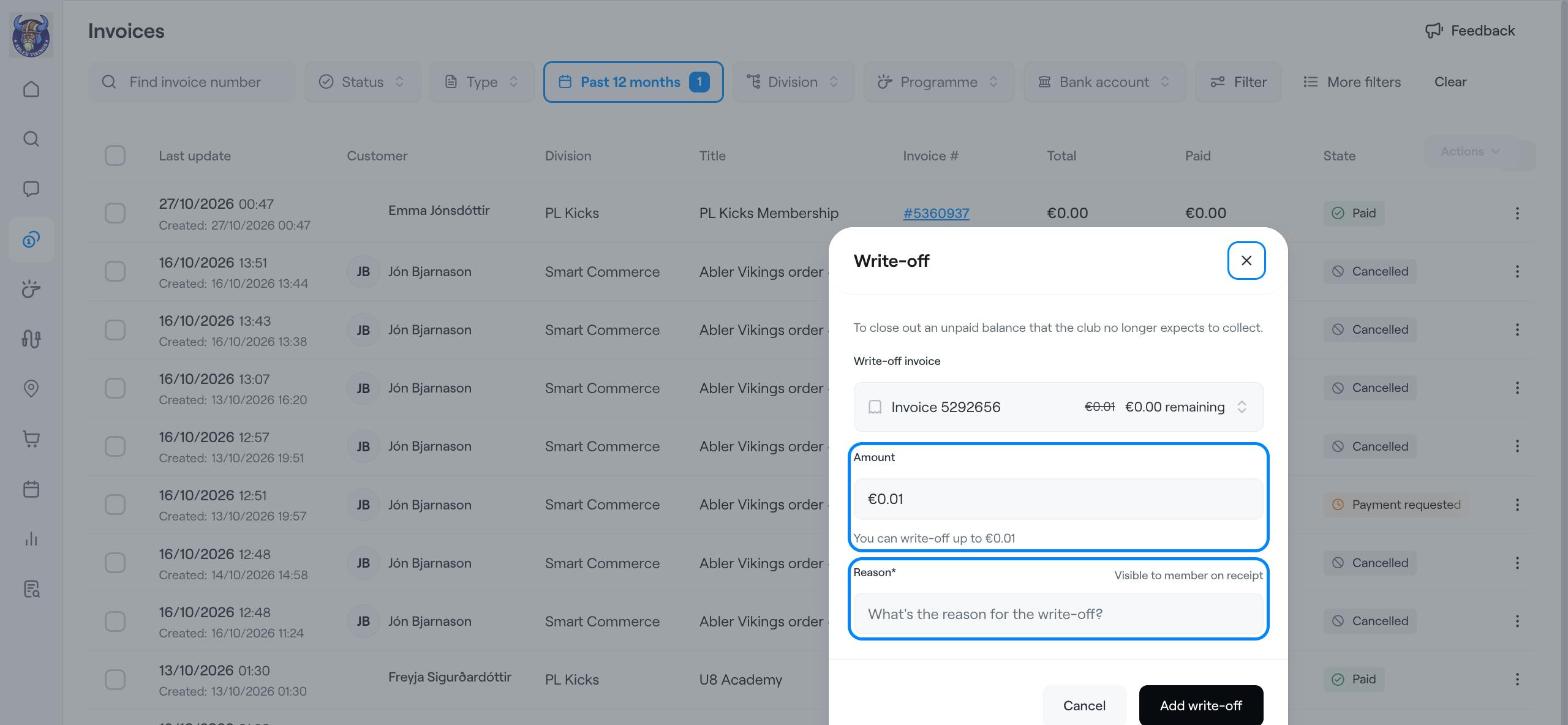
Write-off invoice: check that the right invoice is selected. Askja shows the amount and what will remain.
Amount: enter how much to write off. You can write off up to the unpaid amount.
Reason: write why, for example "Remaining balance waived by the board". This is required and the member can see it on their receipt.
Click Add write-off.
The written-off amount is shown on the invoice and under Finance → Transactions, with the club as the payer.
Write a clear reason. It helps your treasurer later and the member sees it on the receipt.
Add a payment to an invoice manually (cash, bank transfer or credit)
Cancel unpaid invoices (one or many)
Refund a payment (full or partial)