Cancel unpaid invoices
Loading…
If an invoice should not be paid, for example because it was created by mistake or the member has left, you can cancel it in Askja. You can cancel one invoice at a time or several at once.
Example: a family registered twice by mistake. You cancel the duplicate invoice.
Cancel only invoices that have not been paid. If money has been paid, refund it instead. See Refund a payment (full or partial).
If the member is leaving the programme, you can also cancel the invoice when you end the registration. See End a registration.
Go to Finance → Invoices (the coin icon in the left menu). Change the date filter, for example to Past 12 months, if you cannot see the invoice.
Find the invoice and click the three dots (⋮) at the end of the row.
Choose Cancel invoice.
Askja asks Cancel invoice? and explains that the member will no longer see it in the shop. Click Yes, cancel invoice.
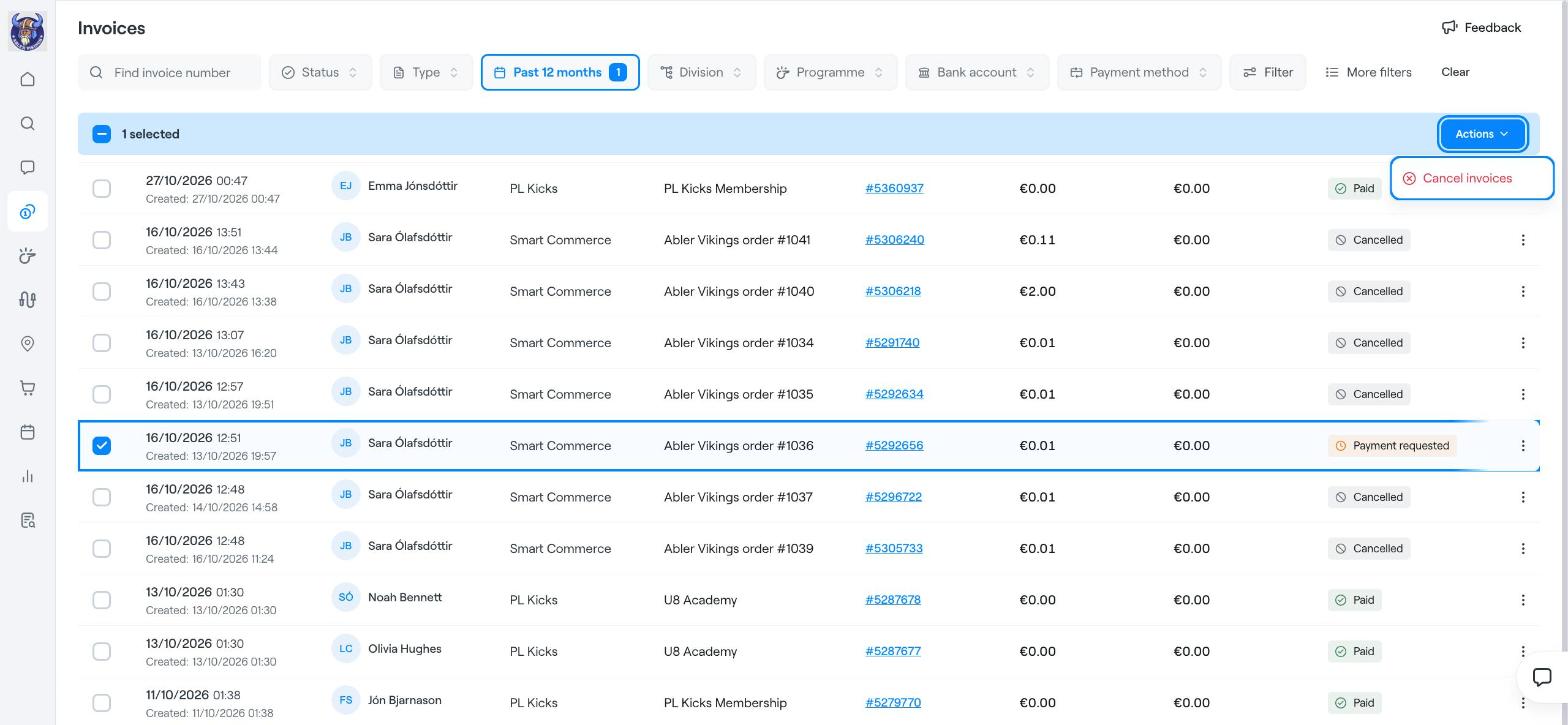
In Finance → Invoices, tick the box at the start of each invoice you want to cancel. Use the filters, for example Status or Programme, to find them quickly.
A blue bar shows how many invoices you have selected. Click Actions on the right.
Choose Cancel invoices and confirm.
The invoice's state changes to Cancelled, and the member no longer sees it in the shop or is asked to pay it.
To lower the amount instead of cancelling the whole invoice, use Apply discount or Write-off from the same ⋮ menu.
Refund a payment (full or partial)
End a registration
Find members, guardians, invoices and more