Add a manual payment to an invoice
Loading…
When a member pays outside the shop, for example in cash at the club or by bank transfer, you can record the payment on their invoice in Askja. The invoice is then marked as paid.
Example: Sara Ólafsdóttir pays her son's camp fee in cash at the clubhouse.
Go to Finance → Invoices (the coin icon in the left menu). Change the date filter if you cannot see the invoice.
Find the invoice and click the three dots (⋮) at the end of the row.
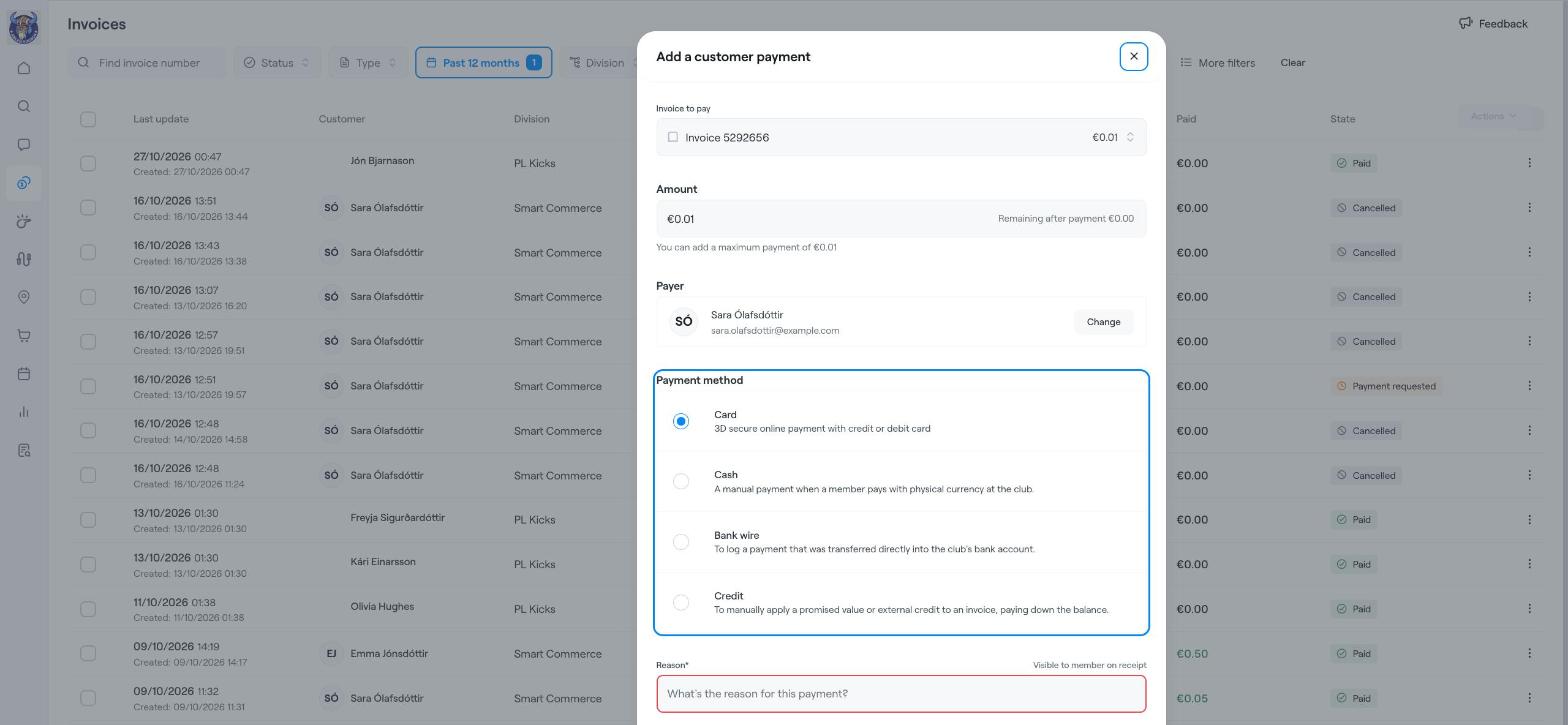
Choose Add payment. The Add a customer payment window opens.
Invoice to pay: check that the right invoice is selected.
Amount: enter how much was paid. Askja shows the most you can add and what remains after the payment. For a part payment, enter a lower amount.
Payer: shows who pays. Click Change if someone else paid, for example the other parent.
Payment method: choose how the member paid:
Card: a 3D Secure online payment with a credit or debit card.
Cash: the member paid with cash at the club.
Bank wire: the money was transferred directly into the club's bank account.
Credit: apply a promised value or an outside credit to pay down the invoice.
Reason: write a short note, for example "Paid in cash at the clubhouse". This is required and the member can see it on their receipt.
Click Add payment.
The invoice shows as Paid (or with the amount still remaining, if it was a part payment), and the payment appears under Finance → Transactions.
If the member should not pay the rest, use Write-off or Apply discount from the same ⋮ menu instead of cancelling the invoice.
Refund a payment (full or partial)
Cancel unpaid invoices (one or many)
Find members, guardians, invoices and more