Apply a discount to an invoice
Loading…
You can lower the amount a member owes on an invoice that has already been issued, for example because of a sibling discount, a hardship agreement or a promotion. The discount can be a percentage or a fixed amount.
Example: the club agrees to give Jón Bjarnason's family 20% off his season fee.
Go to Finance → Invoices (the coin icon in the left menu). Change the date filter if you cannot see the invoice.
Find the invoice and click the three dots (⋮) at the end of the row.
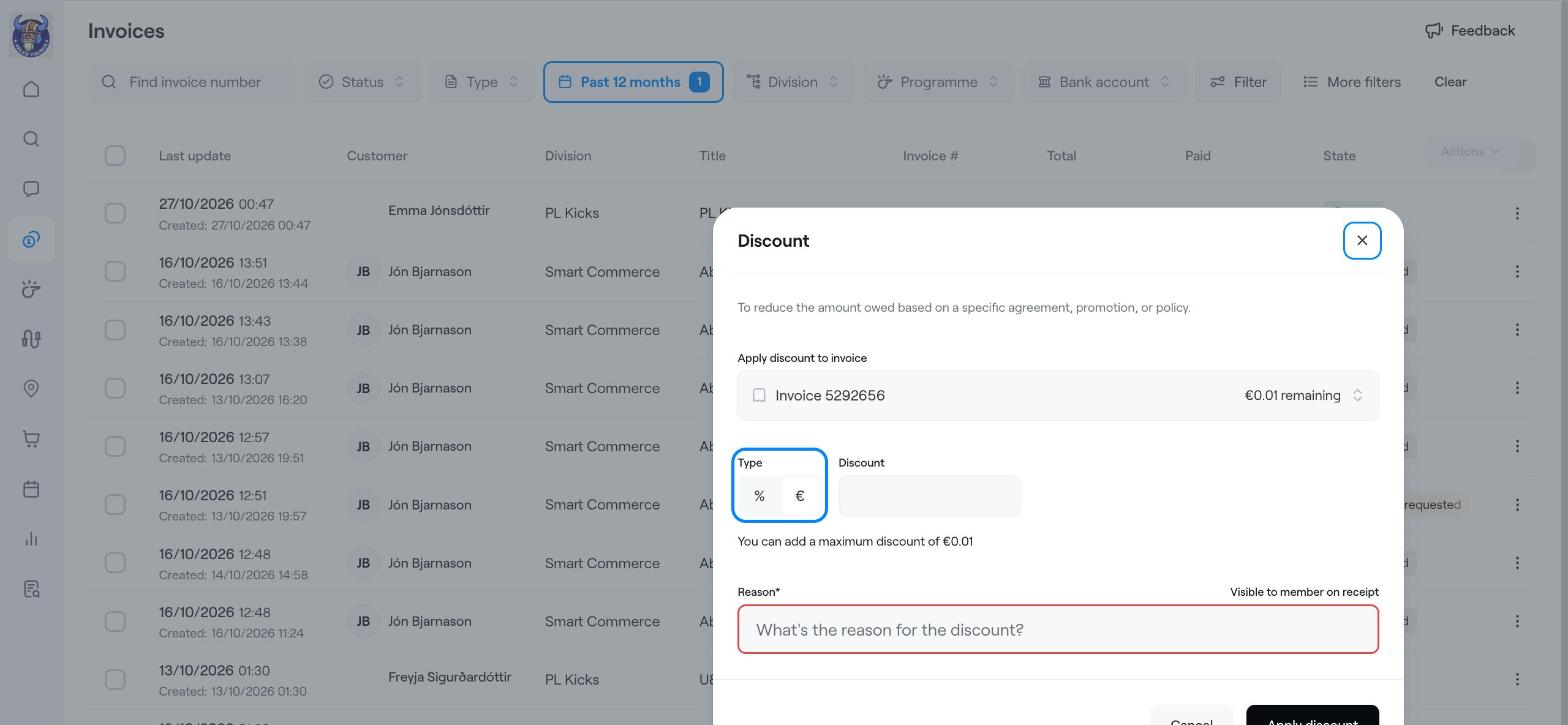
Choose Apply discount. The Discount window opens.
Apply discount to invoice: check that the right invoice is selected. Askja shows the amount that is still unpaid.
Type: choose % for a percentage or € (your currency) for a fixed amount.
Discount: enter the percentage or amount. Askja shows the maximum discount you can give.
Reason: write why, for example "Sibling discount agreed with the board". This is required and the member can see it on their receipt.
Click Apply discount.
You can only discount the part of the invoice that has not been paid yet. If the member has already paid, refund the difference instead. See Refund a payment (full or partial).
To give a discount automatically to everyone who qualifies, set up a discount code or automatic sibling discount instead. See Discount Coupon and Automatic sibling discount.
Write off an unpaid balance
Refund a payment (full or partial)
Automatic sibling discount