Use a municipality grant (frístundastyrkur) on an invoice
Loading…
In Iceland, many municipalities give children a leisure grant (frístundastyrkur) that can be used to pay training fees. Most parents use the grant themselves at checkout. If a parent forgot, or the grant should be added afterwards, you can add it to the invoice as a payment.
Example: a parent paid the rest of the training fee by card but forgot to use the 50,000 kr grant. You add the grant to the invoice with the child's kennitala.
Go to Finance → Invoices and click the invoice.
Click the three dots (⋮) in the top-right corner and choose Add payment.
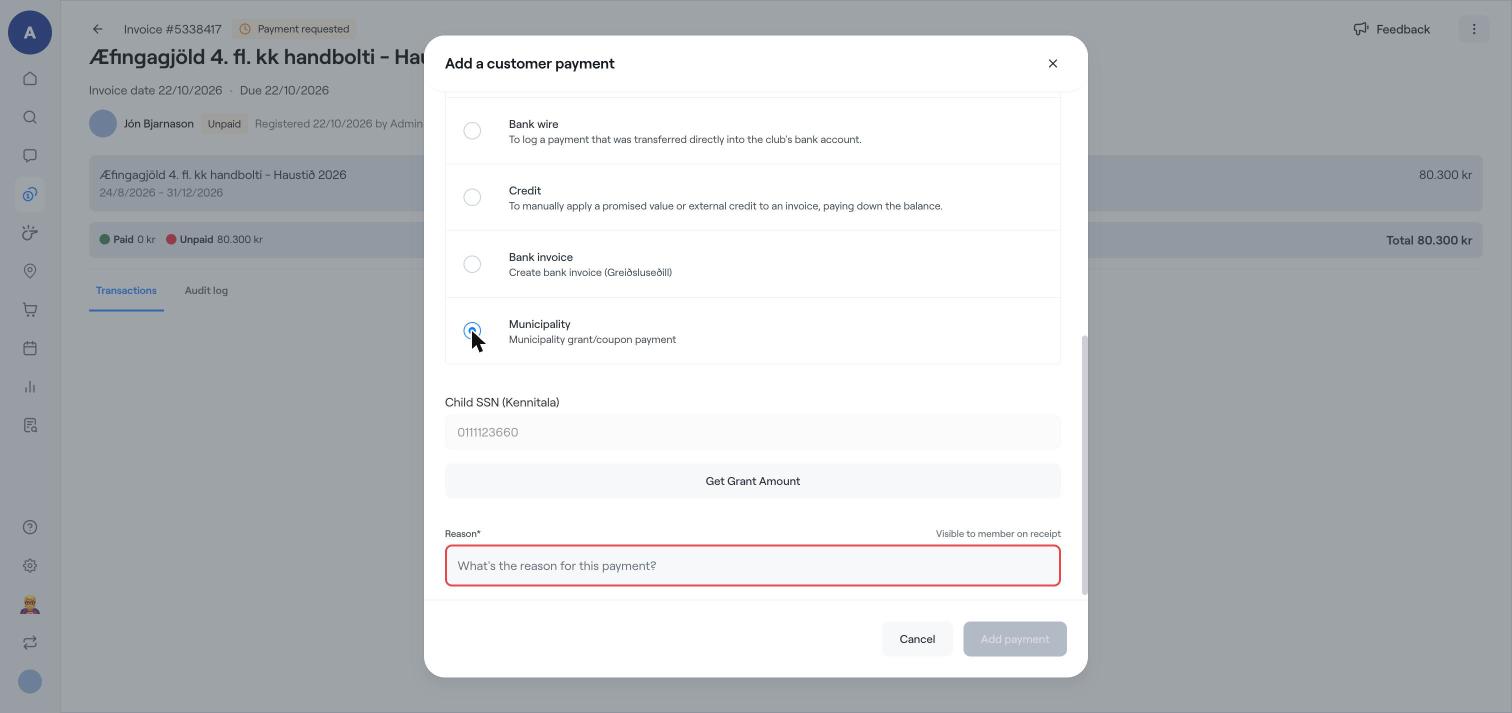
Under Payment method, choose Municipality (Municipality grant/coupon payment).
Enter the child's kennitala under Child SSN (Kennitala).
Click Get Grant Amount. Abler checks with the municipality how much grant the child has left and fills in the amount.
Write a Reason, for example "Frístundastyrkur 2026". It is shown to the member on the receipt.
Click Add payment.
The grant is shown in the invoice's Transactions, and the amount the member still owes goes down.
The programme must be registered with the municipality for the grant to be available. See Register a programme for municipality grants (frístundastyrkur).
The grant can only be used once per child per period, so a grant used at another club is no longer available.
Create a bank invoice (Iceland)
Add a manual payment to an invoice
Find and manage invoices