Create a bank invoice (Iceland)
Loading…
Clubs in Iceland can send a bank invoice (greiðsluseðill) for an unpaid invoice. The bank invoice shows up in the payer's online bank, and the payment is matched to the invoice automatically when it is paid. You can split the amount into several bank invoices.
Example: a parent wants to pay the 80,300 kr autumn training fee in three parts. You create three bank invoices on the invoice.
Go to Finance → Invoices and click the invoice. You can also open it from the member, the registration or the programme.
Click the three dots (⋮) in the top-right corner and choose Add payment.
Check the Amount and the Payer. Click Change if the bank invoice should go to someone else, for example the other parent.
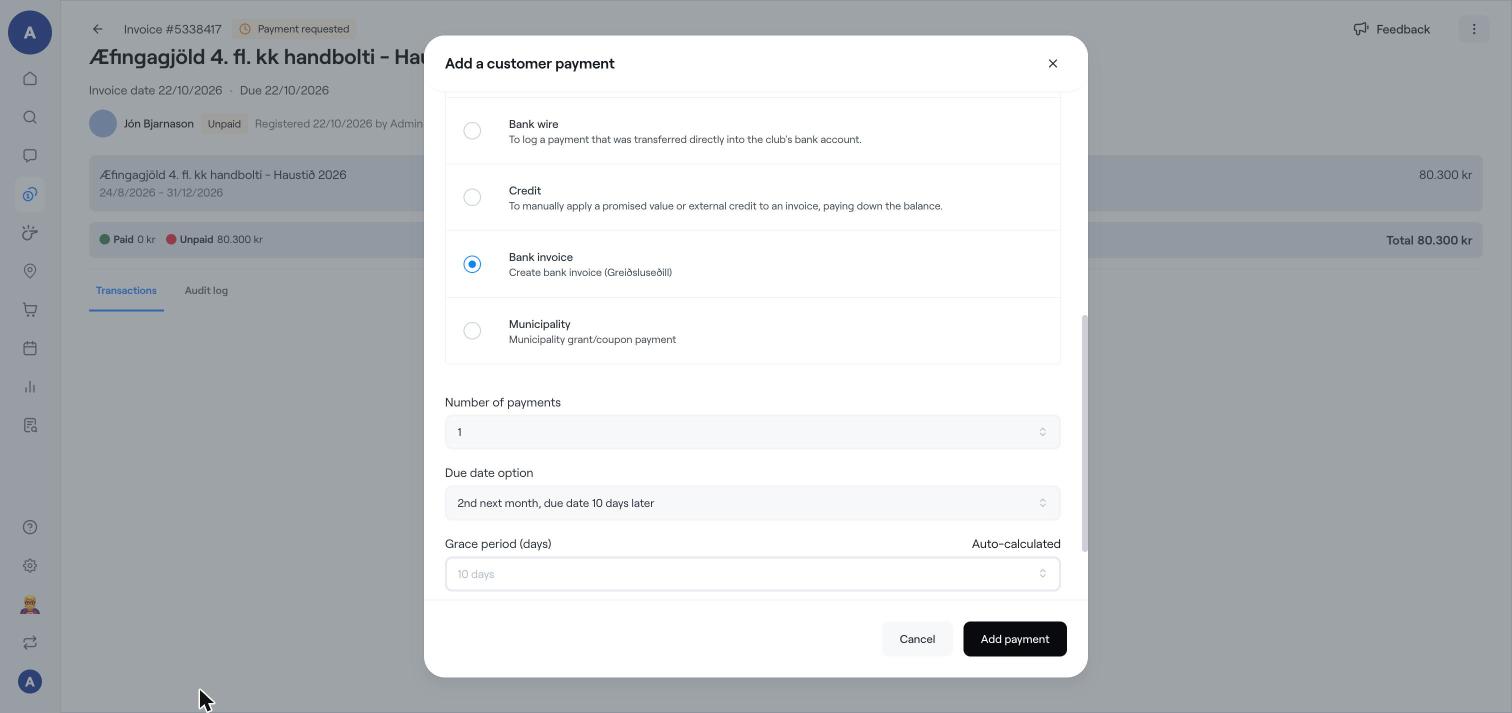
Under Payment method, choose Bank invoice (Create bank invoice (Greiðsluseðill)).
Choose the Number of payments, for example 3 to split the amount into three bank invoices.
Choose the Due date option, for example "2nd next month, due date 10 days later". The Grace period is calculated automatically.
Write a Reason. It is shown to the member on the receipt.
Click Add payment.
The bank invoice is shown in the invoice's Transactions as Unpaid (in e-bank) until it is paid.
In the invoice's Transactions, click the three dots (⋮) next to the bank invoice. You can Change due date, Update Status, Mark as paid (for example if it was paid another way) or Cancel it.
This option is only available for clubs in Iceland with bank invoices set up.
Bank invoices can also be part of an instalment plan the member chooses at checkout.
Add a manual payment to an invoice
Use a municipality grant (frístundastyrkur) on an invoice
Find and manage invoices