Track coach certificates
Many clubs require coaches to hold certain certificates, for example a safeguarding course, a first aid certificate or a background check. In Staff Management you can see at a glance which coaches are compliant and when their certificates expire.
Example: before the new season you check that all head coaches have a valid safeguarding certificate.
1. Open Certificates
Click the coach icon in the left menu to open Staff Management.
Under Certificates, choose Certificates.
2. Read the overview
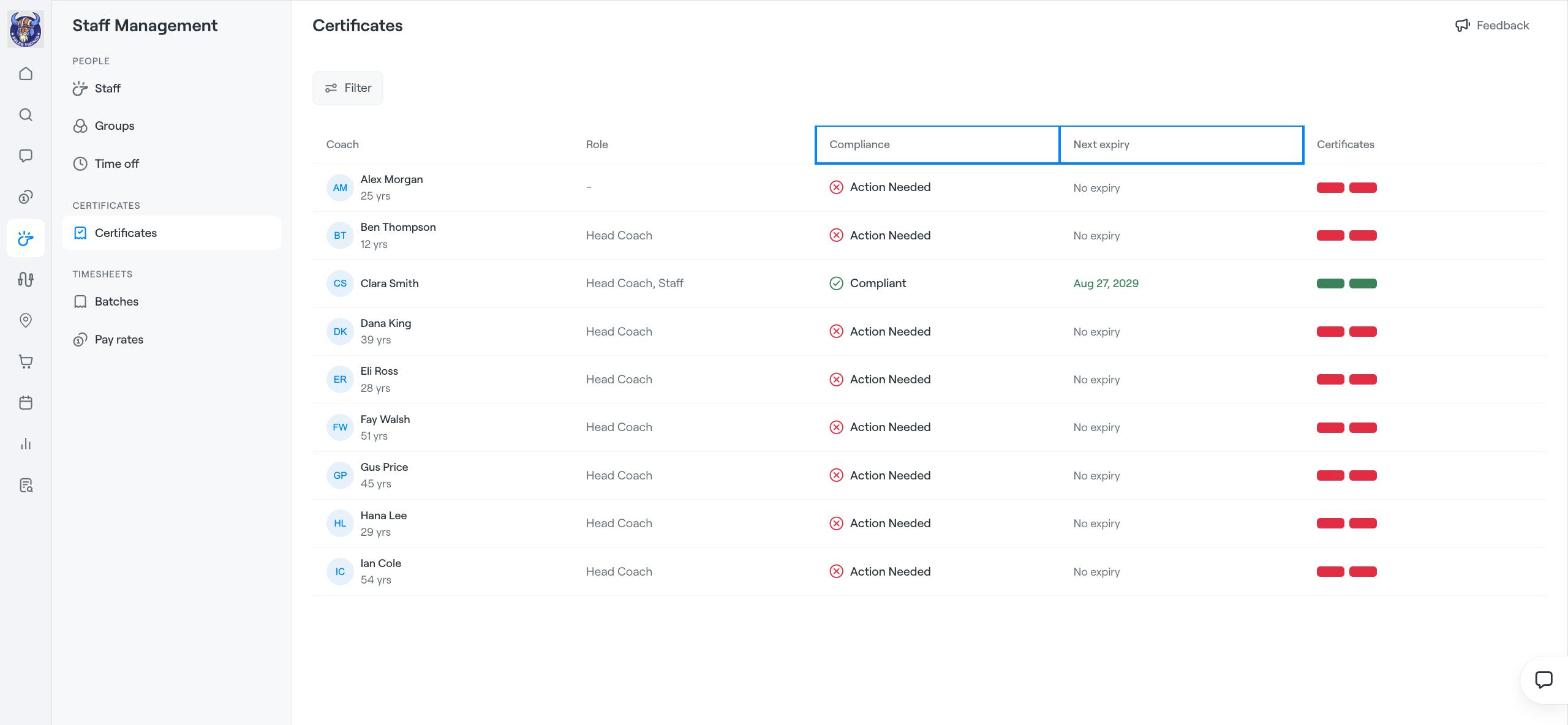
Each row shows a coach and:
Role: for example Head Coach or Staff.
Compliance: Compliant if the coach has all required certificates, or Action Needed if something is missing or expired.
Next expiry: the date the next certificate expires, or No expiry.
Certificates: one coloured marker per required certificate. Green means valid, red means missing or expired.
Use Filter to show, for example, only coaches who need action.
3. Update a coach's certificates
Click a coach to see their certificates and add or update one, for example by uploading a new certificate with its expiry date.
Tip
Check Next expiry at the start of each term so coaches can renew certificates before they run out.
Related articles
Staff management: overview and adding staff
Add Coaches