Staff management overview
Loading…
Staff Management is where you manage everyone who works for the club: coaches, assistants and other staff. You can see their roles and groups, register time off, keep track of certificates, and handle timesheets and pay.
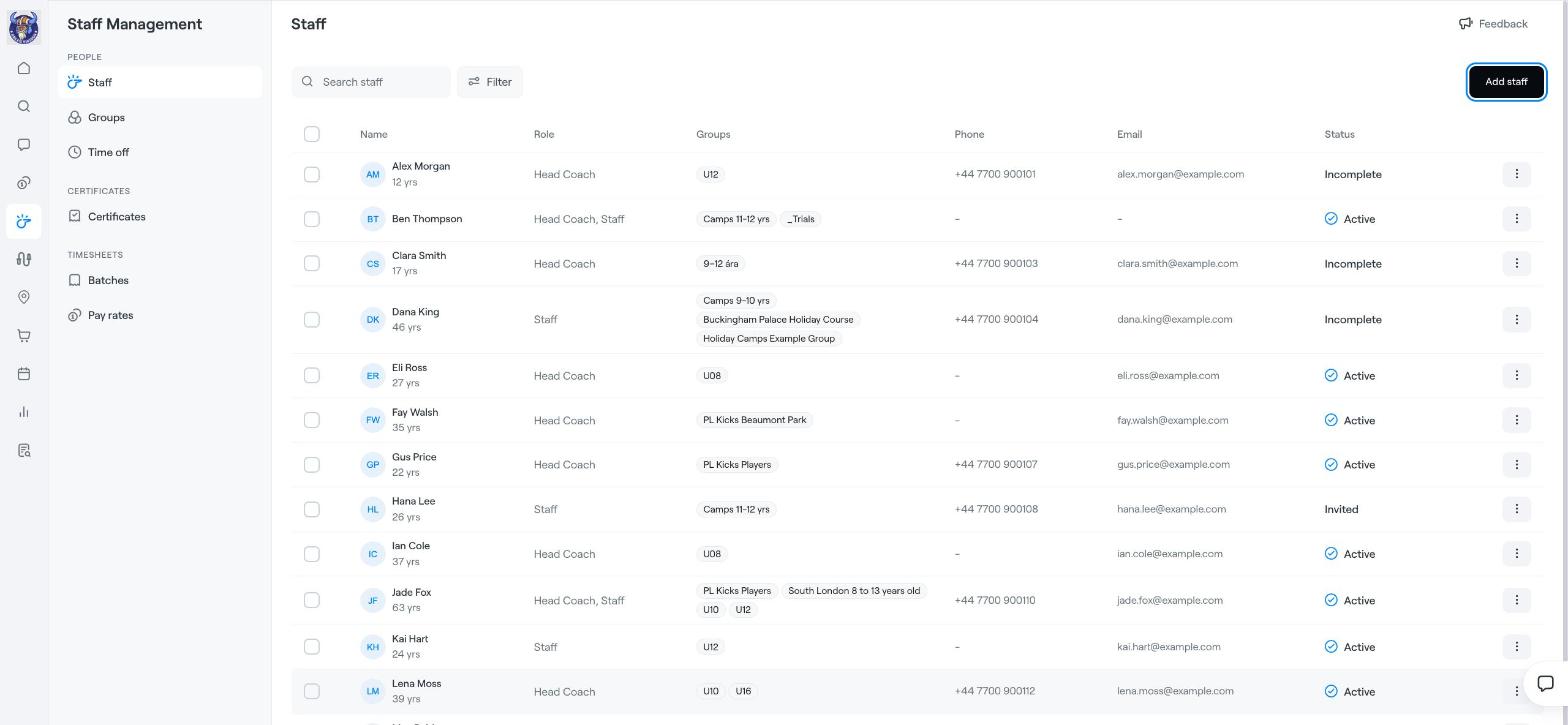
Click the coach icon in the left menu. The menu on the left has three parts:
People: Staff, Groups and Time off.
Certificates: coaches' certificates and compliance.
Timesheets: payroll Batches and Pay rates.
New to Staff Management? Click Take the tour for a short guided tour.
Staff lists everyone with their Role (for example Head Coach or Staff), the Groups they work with, Phone, Email and Status:
Active: the person has an Abler account and is set up.
Invited: an invitation has been sent but not accepted yet.
Incomplete: some details are missing.
Use Search staff and Filter to find people. Click the three dots (⋮) on a row for more actions.
Click Add staff in the top-right corner.
Fill in the person's details and choose their role and groups.
Save. The person gets an invitation to Abler.
You can also add staff to a specific group: open Groups in Staff Management and click Add staff on the group, or use the group's ⋮ menu under Home → Groups.
Groups shows every group with how many staff it has, so you can quickly spot groups without a coach.
Staff time off
Coach certificates and compliance
Timesheets: pay rates and payroll batches
Add Coaches
Staff time off
Coach certificates and compliance
Timesheets: pay rates and payroll batches