Take attendance on the web
Loading…
You can see who is coming to an event and record who actually attended, directly in Askja. This is useful after a session, or when a coach wants to update attendance on a computer instead of in the app.
Go to Home → Events, or open the group and its Events tab.
Click the event's name. The event opens in a panel on the right. Click the expand icon to open it full screen.
At the top you see the Response (going and not going), when and where the event is, the Subgroups, the Staff and the Attendance so far (present and absent).
Open the Members tab.
Use the filters Going, Not Going, Not Responded, Present and Absent, or search for a member.
For each member, choose their attendance: Present, Late, Absent, Sick, Leave, Injured or Other. The change is saved straight away.
To update many members at once, tick them and use Actions.
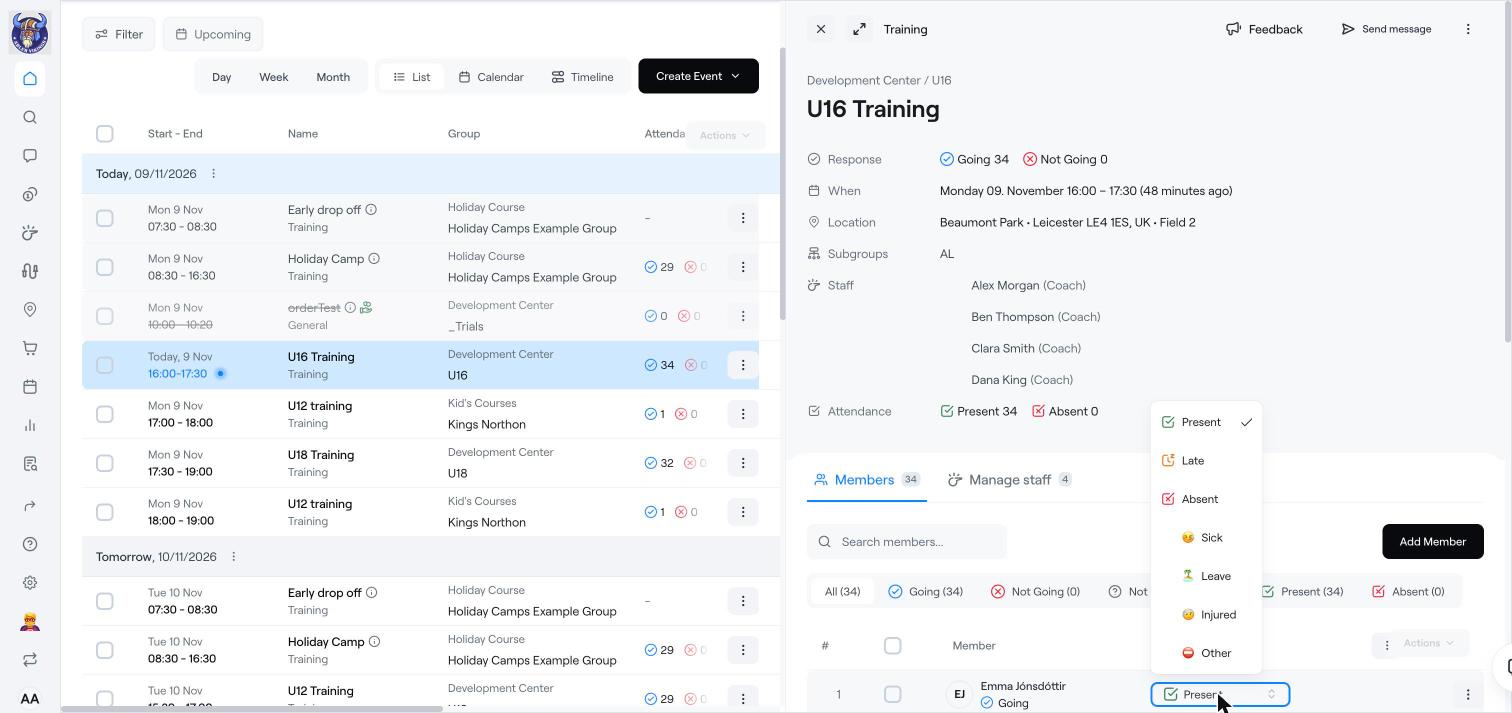
Add Member: add someone to this event only.
Manage staff: add or remove coaches for this event.
Send message: message the participants.
If Players attending by default is on, members are marked as present unless someone changes it.
Attendance shows up in Reports → Attendance.
Reports
Edit, cancel or delete an event
Clear attendance on an event