Online shop settings: open or close the store, pickup and delivery
Loading…
In the store settings you choose whether your online shop is open, and how buyers get their orders: pickup at the club, delivery, or both.
Click the shopping cart icon in the left menu and open the Settings tab.
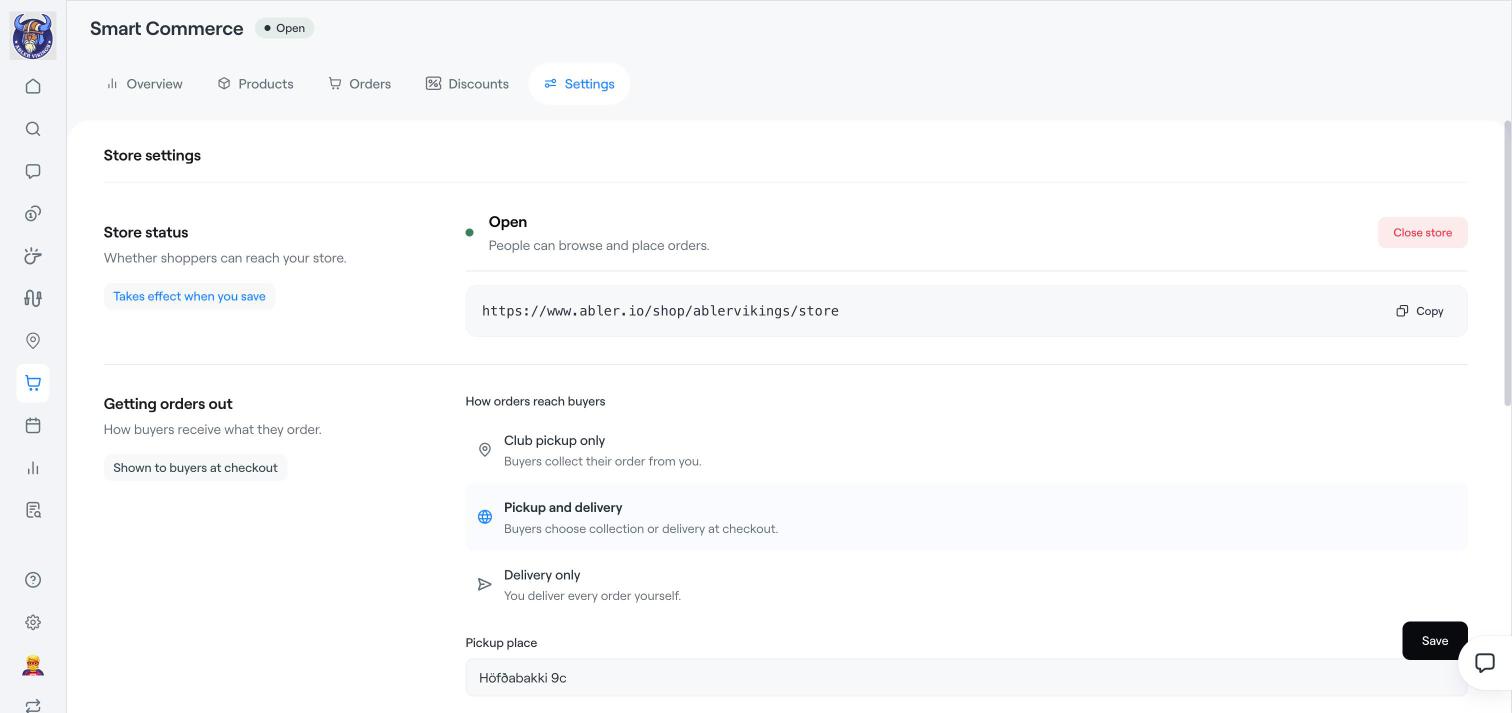
Under Store status, the store is Open when people can browse and place orders. Click Close store to stop orders, for example during a stock-take. Click Copy to copy the link to your store and share it on your website or social media. Changes take effect when you save.
Under Getting orders out, choose:
Club pickup only: buyers collect their order from you. Add the Pickup place and Pickup times.
Pickup and delivery: buyers choose collection or delivery at checkout.
Delivery only: you deliver every order yourself.
For delivery, choose where you deliver (for example Deliver anywhere or specific Countries you deliver to), the Delivery fee and the Delivery VAT category. This is shown to buyers at checkout.
Click Save.
The payments setup for the shop is done by Abler. Contact Abler support if your store is not yet linked to payments.
Smart Commerce overview
Manage and hand over orders
Create discounts in the online shop