Analytics: members, finance and staff timesheets
Loading…
Analytics gives you dashboards with charts of how your club is doing: how many members you have, how money comes in, and how many hours staff work. Use it for a quick overview. For detailed lists to export, use Reports.
Click the chart icon in the left menu. Choose a dashboard on the left: Members, Finance or Staff timesheet.
The Club dashboard – Members has three tabs:
Members: members in active programmes per division over time, the current month's members, and the number of unique members per year.
Member profile: who your members are, for example by age and gender.
Players at risk: members who may be about to stop, so you can follow up in time.
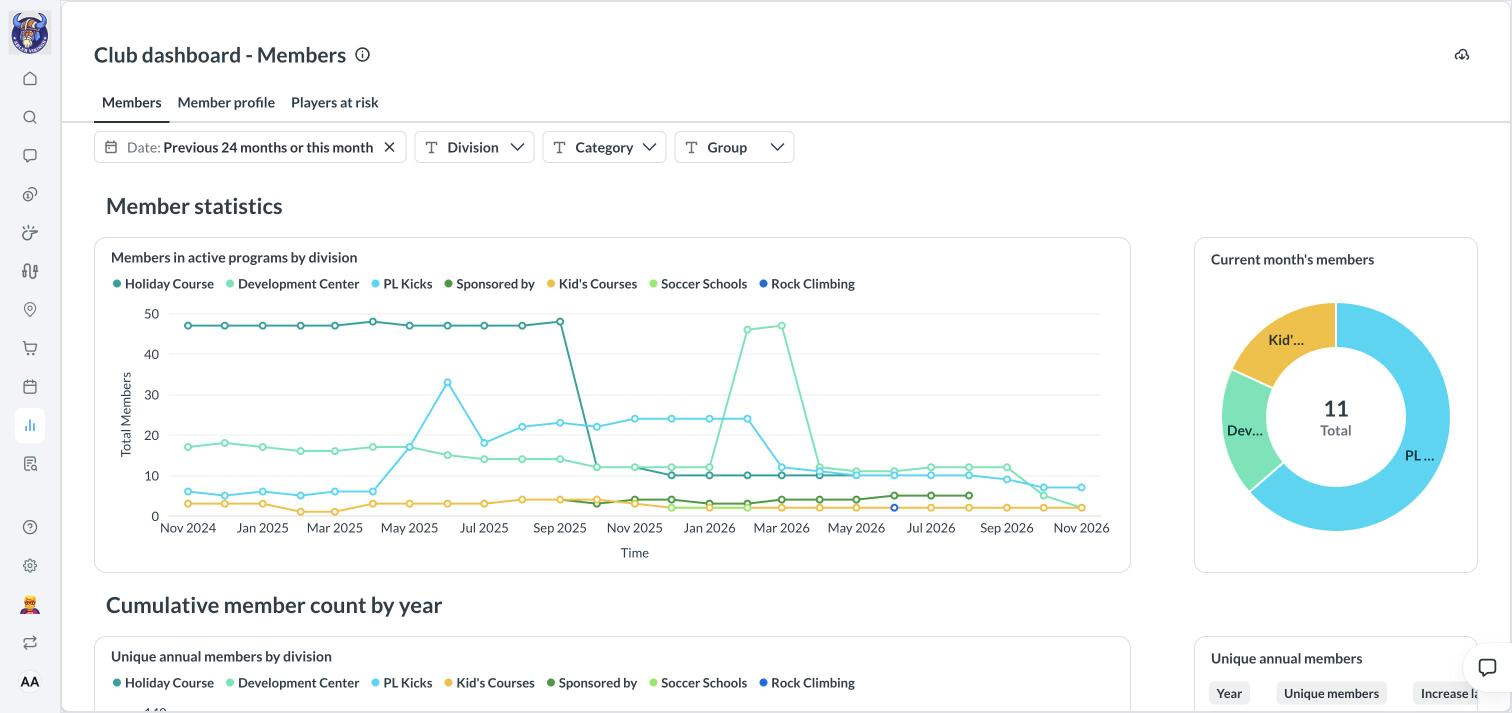
Use the filters at the top to change the Date range (for example the previous 24 months) and to narrow the charts by Division, Category or Group. Click the download icon in the top-right corner to download the dashboard.
Finance: income and payments over time across your divisions.
Staff timesheet: hours logged by coaches and staff. For pay and payroll, see Set pay rates and create payroll batches.
Reports
Invoice summary
Set pay rates and create payroll batches