Turn on features for your club (Advanced settings)
Loading…
Many parts of Abler are features that are switched on per club, for example classes, venue booking or the online shop. You can see which features are on under Settings → Advanced. Only Abler can change these settings (they are
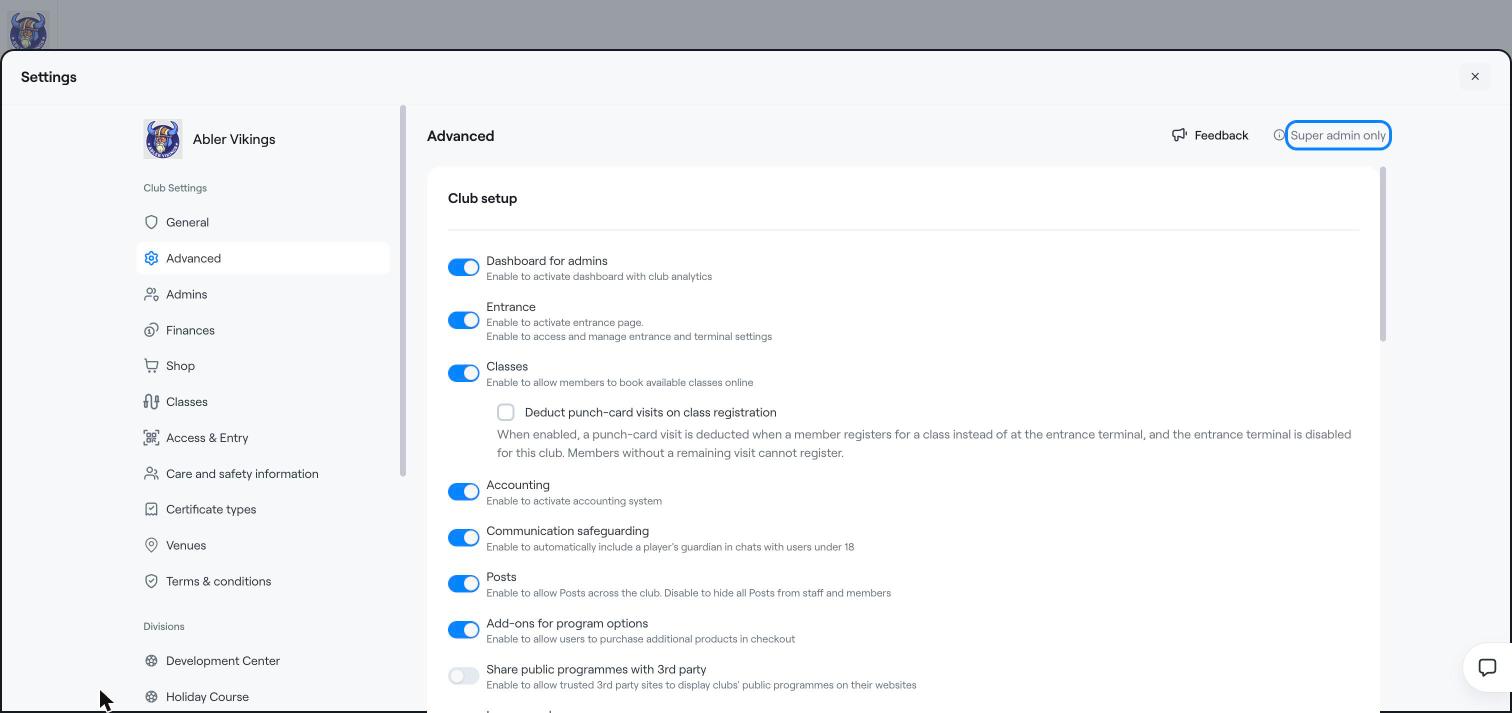
marked Super admin only), so contact Abler support if you want a feature turned on or off.
Dashboard for admins: the Analytics dashboards. See Analytics: members, finance and staff timesheets.
Entrance: the check-in page and terminal settings. See Access and entry: access types, check-in and terminals.
Classes: members can book classes online. With Deduct punch-card visits on class registration, a punch-card visit is used when the member books a class instead of at the entrance terminal.
Accounting: the accounting system, for example accounting categories.
Communication safeguarding: a player's guardian is automatically included in chats with users under 18.
Posts: posts across the club. When off, posts are hidden from staff and members.
Add-ons for program options: members can buy extra products at checkout.
Share public programmes with 3rd party: trusted partner websites can show your public programmes.
Income code: income codes for programmes and divisions, optionally required when creating a programme. See Income codes and mapping.
Enable VAT: set a default VAT category per division and override it on products and events, optionally required on every option and payable event. See Set the VAT category for what you sell.
Time off, Staff certificates and Timesheets. See the Staff management section.
Venue booking: online booking of your facilities. See the Venue booking section.
Abler Smart Commerce: an online shop for club products, with payments in a separate Smart Commerce division. See the E-commerce section.
Under Discount types, Abler chooses which discounts your club can use: Discount code (multi-use), Multiple single-use codes, Giftcards and Automatic discounts.
General settings
Create a discount code
Set up an automatic sibling discount