Registration Fee (Deposit)
Loading…
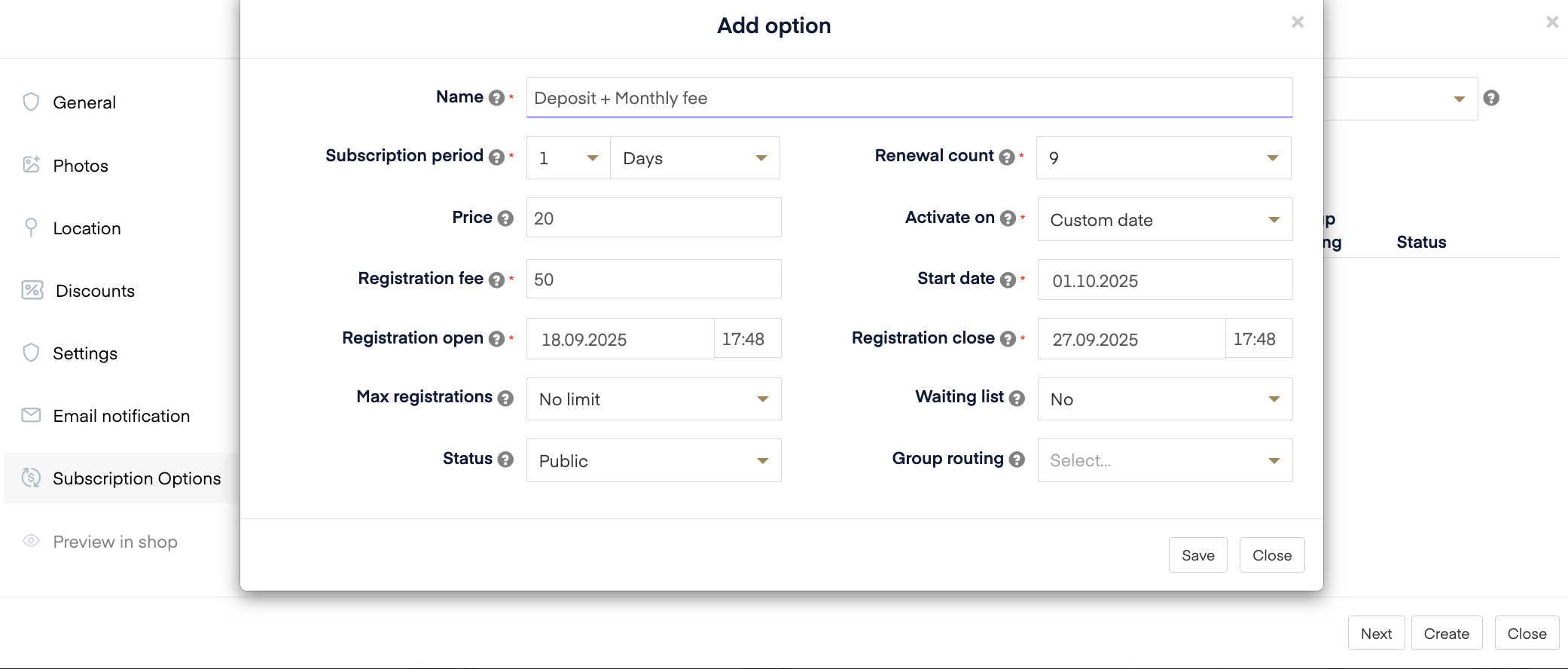
In Abler you can now set up a registration fee when creating a subscription. This is an upfront fee that the customer pays at the time of booking. Some clubs might call it an admin fee or a deposit, but in Abler we call it the Registration fee.
The registration fee gives you flexibility when setting up payments. It does not have to be limited to monthly subscriptions – you can use it in different ways depending on your setup.
When creating a subscription service, you can set:
Registration fee – The upfront payment the customer pays when they sign up (e.g., £70).
Price – The next payment amount, which can either be:
A recurring payment (e.g., £25 every month for 9 months), or
A one-time payment (e.g., £100 collected once after the registration fee).
Start date – The date when the next payment (recurring or one-time) will be charged.
Renewal count – How many times the recurring payment should be collected. If you only want one extra payment after the registration fee, you can set the renewal count to 1.
Deposit + Monthly fee
Registration fee: £70 (paid at sign-up)
Monthly fee: £25
Renewal count: 9
Customer pays £70 upfront, then £25 each month for 9 months.
Deposit + One extra payment
Registration fee: £70 (paid at sign-up)
Next payment: £100
Renewal count: 1
Customer pays £70 upfront, then one more payment of £100 on the start date.
Where do I set the registration fee?
1. Go to Service overview - Add - Add Subscription service
2. Fill out the information
3. Once you are on the service option screen click on the arrow next to active on and choose Custom date