Create a post
Loading…
Posts are announcements that appear on the wall in the Abler app, for example news, photos from a tournament or a reminder about the season. You choose who sees each post: the whole club, a division, a group or a subgroup.
Example: you want to share photos from the U12 tournament with the U12 players and their guardians.
Go to Home → Overview.
Under New post, click What's new?.
Write your post. Use the icons to add an emoji, attach a file or add images.
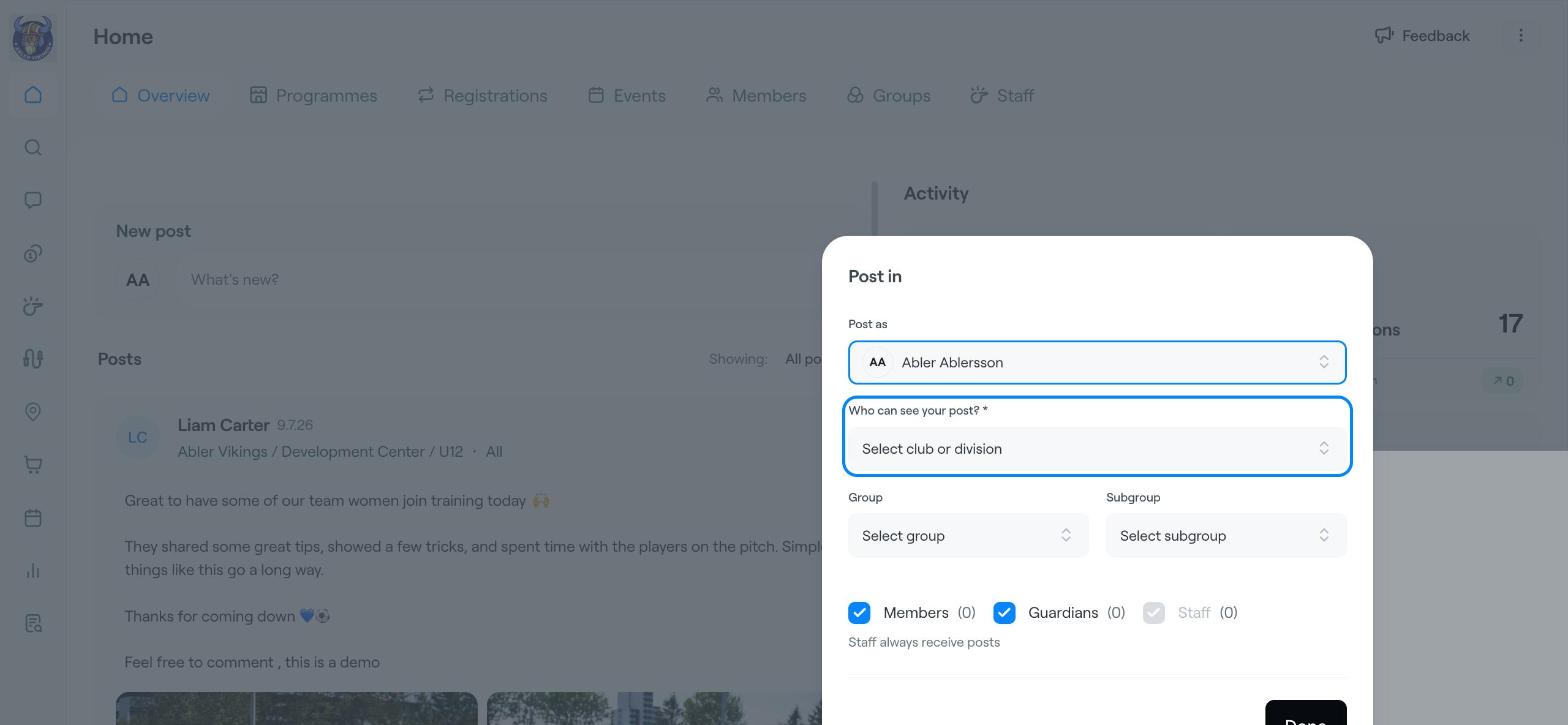
At the top of the post, click Select an audience for your post. The Post in window opens.
Post as: choose who the post is from.
Who can see your post?: choose the club or a division. This is required.
To narrow it down, choose a Group and, if you like, a Subgroup.
Tick Members, Guardians or both. Staff always receive posts.
Click Done.
Allow comments: turn on if people can comment on the post.
Pin post: turn on to keep the post at the top of the wall.
Click Post to publish it.
Your posts are listed under Posts on the Overview page. Use Showing to filter them. Click the three dots (⋮) on a post to manage it.
Use a post for news that everyone in a group should see, and a message when you need to reach people directly. See Send messages to groups, families or members.
Send messages to groups, families or members
Create Your First Post